[diffusion-planner] nuplan/planning/script/builders/simulation_builder.py
diffusion planning
목록 보기
16/19
1. build_simulations
build_simulations함수는시뮬레이션 객체들을 생성하고 구성- 이 함수는 주어진 설정(cfg), 작업자 풀(worker), 콜백(callback) 목록, 그리고 (선택적으로) 미리 만들어진 플래너들을 활용하여,
- 각 시나리오에 대해 시뮬레이션을 구축
1.1. 상세한 동작 설명
1. 초기 설정 및 시나리오 추출
- 로깅과 컨테이너 초기화:
- 시뮬레이션 객체를 담을 빈 리스트(
simulations)를 생성
- 시뮬레이션 객체를 담을 빈 리스트(
- 시나리오 추출:
DistributedScenarioFilter인스턴스를 생성하여- 분산 처리 환경(노드, 동기화, 분산 모드 등)에 맞게
- 각 노드가 처리할 시나리오 목록을 결정
- scenario_filter.get_scenarios()를 호출하여 현재 노드가 처리할 시나리오들을 추출
- 분산 처리 환경(노드, 동기화, 분산 모드 등)에 맞게
2. 메트릭 엔진 구성 (옵션)
- 메트릭 사용 여부 확인:
- 설정(cfg)에서
run_metric이 활성화되어 있으면,build_metrics_engines함수를 호출하여- 시나리오별 메트릭 엔진들을 구축하고 이를
metric_engines_map에 저장
- 시나리오별 메트릭 엔진들을 구축하고 이를
- 설정(cfg)에서
3. 시뮬레이션 객체 및 플래너 생성
-
각 추출된 시나리오에 대해 다음 작업을 수행합니다:
-
플래너 생성:
- 만약 미리 만들어진 플래너(
pre_built_planners)가 제공되지 않았다면,- 설정(cfg) 내에 'planner' 항목이 반드시 있어야 하며,
- 이를 기반으로
build_planners함수를 통해, 해당 시나리오에 맞는 플래너들을 생성
- 이미 미리 생성된 플래너가 있다면, 이를 그대로 사용
- 만약 미리 만들어진 플래너(
-
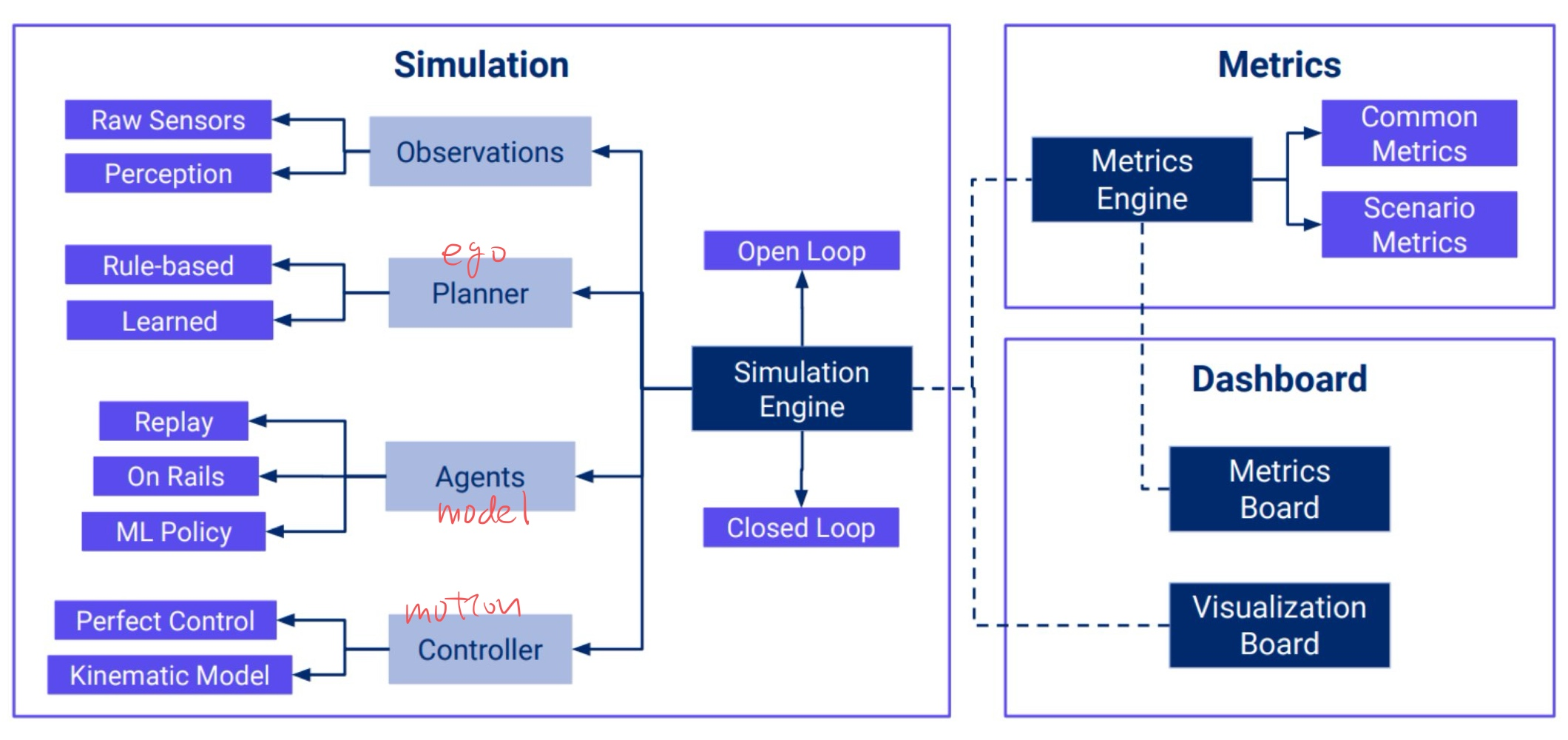
-
각 플래너에 대해 아래 단계를 수행:
-
Ego Controller 구성:
- 설정(cfg)의
ego_controller를 기반으로, 현재 시나리오를 인자로 전달하여 Ego 차량의 제어 로직(예: TwoStageController)을 생성합니다.
- 설정(cfg)의
-
시뮬레이션 시간 관리:
simulation_time_controller를 설정(cfg)의simulation_time_controller항목을 통해 인스턴스화하여, 시뮬레이션 진행 시간과 반복(iteration)을 관리합니다.
-
관측(Observation) 빌드:
build_observations함수를 호출하여, 시나리오에 대한 관측 데이터를 구성- 이 관측 데이터는 플래너가 상황을 판단할 때 필요한 센서 및 환경 정보를 포함합니다.
-
메트릭 콜백 구성 (옵션):
- 현재 시나리오의 유형에 따라
metric_engines_map에서 해당 메트릭 엔진을 가져옴 - 만약 메트릭 엔진이 존재하면,
MetricCallback을 생성해 상태 기반 콜백(stateful callback) 목록에 추가 - 또한, 설정(cfg) 내에
"simulation_log_callback"이 정의되어 있으면, 이를 인스턴스화하여 상태 기반 콜백 목록에 추가
- 현재 시나리오의 유형에 따라
-
시뮬레이션 환경 구성:
- 위에서 생성한
simulation_time_controller,observations,ego_controller그리고 현재 시나리오를 모아SimulationSetup객체를 만듦
- 위에서 생성한
-
Simulation 객체 생성:
Simulation객체를 생성하는데,- 이때
SimulationSetup, - 그리고 앞서 전달받은 콜백(callback) 목록과
- 추가한 상태 기반 콜백(stateful callbacks)을
MultiCallback으로 묶어 전달
- 이때
- 또한, 시뮬레이션 이력을 보관할 버퍼 지속시간(simulation_history_buffer_duration)도 설정에서 가져옴
-
SimulationRunner 생성:
- 마지막으로, 생성된
Simulation객체와 현재 플래너를 묶어SimulationRunner객체를 만들고, 이를simulations리스트에 추가
- 마지막으로, 생성된
-
4. 최종 반환
- 모든 시나리오에 대해 위 작업을 마치면, "Building simulations...DONE!" 로그를 남기고 최종적으로 생성된
SimulationRunner객체들의 리스트를 반환
요약
build_simulations함수는 다음과 같은 역할을 수행
-
시나리오 추출:
- 분산 처리 환경에 맞게 현재 노드가 처리할 시나리오들을 선택
-
플래너, Ego Controller, 시간 제어, 관측 데이터 등 각 구성 요소를 생성:
- 각 시나리오에 대해 플래너와 제어, 시간 관리, 관측 정보를 인스턴스화하여 시뮬레이션 환경을 구축
-
메트릭 엔진 및 관련 콜백 추가 (옵션):
- 시나리오 유형에 맞게 메트릭을 수집하고 집계할 수 있도록 관련 콜백을 구성
-
SimulationRunner 객체 생성 및 반환:
- 시뮬레이션 설정과 플래너를 묶어 실행 가능한 SimulationRunner 리스트를 생성해 반환

ad_official